

If you’re in tech right now, or that you just use twitter (or X as Elon insists we call it) you’ve heard of OpenClaw (aka Clawdbot/moltbot/whatever they decide to name it tomorrow).
180,000+ GitHub stars in ten weeks. Faster adoption than React or Kubernetes ever managed. Developers are calling it “the closest thing to JARVIS we’ve seen.” One user said “this is the endgame of digital employees.” Another said “it will actually be the thing that nukes a ton of startups, not ChatGPT.” IBM called it a fundamental shift in how AI agents are built.
So naturally, I wanted in.
And I failed.
The Humbling
I am not technically an idiot. I have a job, responsibilities, and people who trust me with important things. And yet a piece of open-source software destroyed my self-esteem in forty-eight hours..
Dedicated Mac Minis. CLIs. API keys. Terminal configs. Gateway tokens. Node.js version mismatches. Tailscale. Channel pairing. Docker containers that refused to contain anything except my frustration.
I tried the official guide. I tried YouTube tutorials. I tried the “quick start” that was quick in the same way a root canal is quick. At one point I was SSH-ing into a server at 2am, Googling “what is a reverse proxy” for the third time that week, wondering if maybe I should just email people like a normal human being.
I mentioned the frustration to the KIISHA team in passing. Just venting. The way you complain to colleagues about traffic, not expecting anyone to build you a new highway.
They said nothing.
Then, on my birthday, they sent me SunClaw.
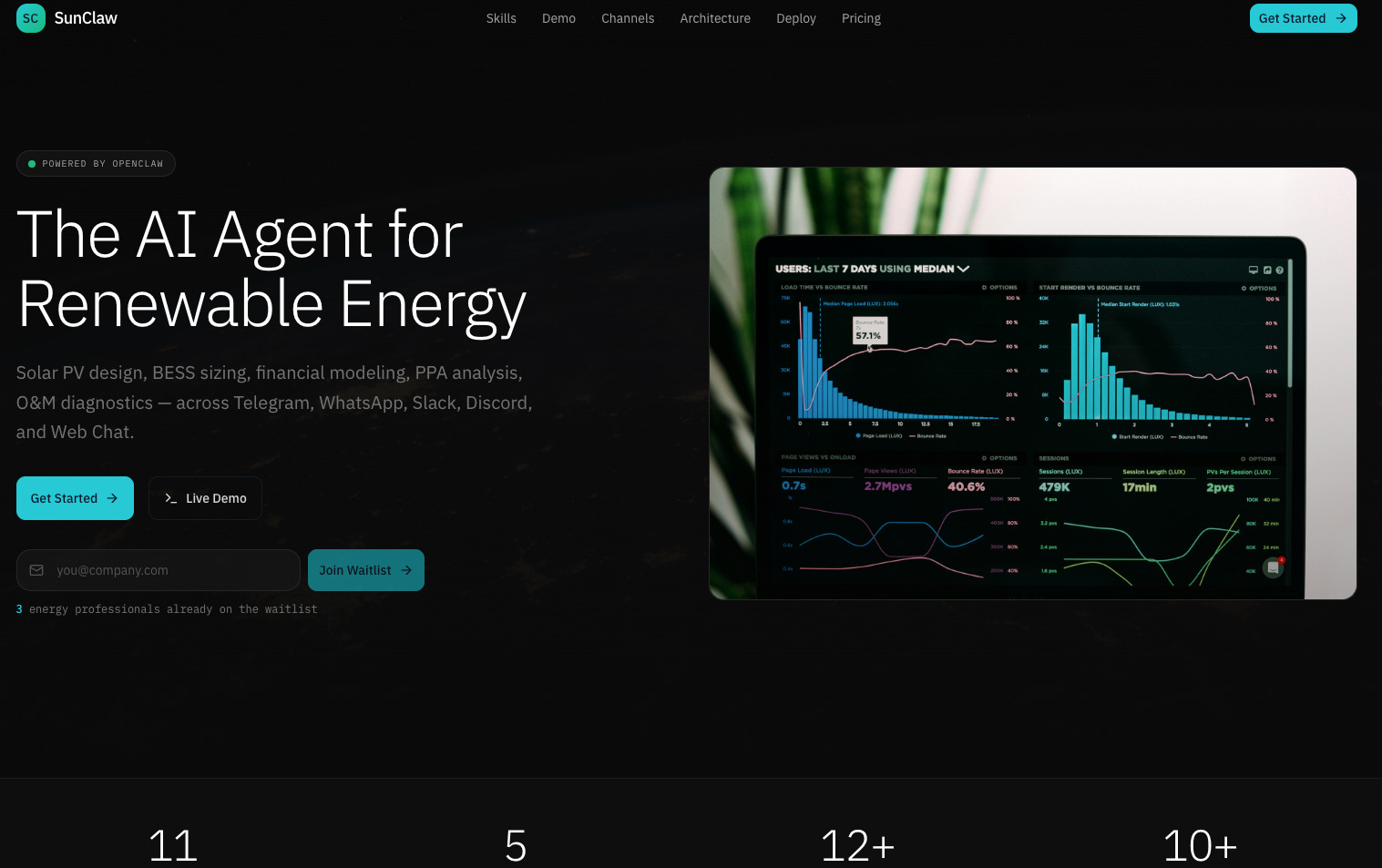
What Is SunClaw, and Why Should You Care?
SunClaw is, and I’m not being dramatic here, the simplest way to set up OpenClaw.
Everything in clicks. Ready in under five minutes. Completely free. Anyone can use it.
But let me back up, because the architecture matters, and I promise to explain it without making you want to close this tab.
OpenClaw is the open-source AI agent runtime. Think of it as the engine that connects large language models to tools, manages conversations, handles plugins, and routes messages across channels like WhatsApp, Telegram, Slack, and Discord. It’s the operating system for AI agents.
SunClaw is KIISHA’s deployment and management layer built on top of OpenClaw. If OpenClaw is the engine, SunClaw is the dashboard, the ignition, and the mechanic who sets everything up so you just have to turn the key.
KIISHA is the AI-native operating system for energy infrastructure underneath it all. It ingests data from everywhere (WhatsApp threads, PDFs, spreadsheets, emails), turns messy asset data into verified, auditable, bankable intelligence, and connects to 200+ integrations.
Here’s how the three layers stack:
Layer 1: SunClaw (Management Dashboard)
├── Config Manager — Deploy & Sync
├── LLM Selector — 16+ AI Providers
├── Channel Control — 5 Messaging Platforms
└── Skill Registry — 11 RE + 50+ OpenClaw Skills
         │
         ▼
Layer 2: OpenClaw Gateway (Agent Runtime)
├── Agent Engine — Reasoning & Tool Use
├── Plugin System — 50+ Built-in Skills
├── KIISHA Bridge — Enterprise API
└── Memory System — Persistent Context
         │
         ▼
Layer 3: External Services
├── Channels: Telegram, WhatsApp, Slack, Discord, Web Chat
├── LLM Providers: Kimi, Groq, OpenAI, Claude, Gemini, Venice...
└── KIISHA Enterprise: Portfolio, VATR, Tickets, Payments
In plain English: you configure everything through SunClaw’s web interface. SunClaw generates the OpenClaw configuration, deploys it to your chosen platform, and gives you a dashboard to monitor and manage everything. Your API keys stay on your server. Never sent to SunClaw. That part matters.
Two Modes, One Agent
SunClaw works in two modes, and this is where it gets interesting for energy people like us.
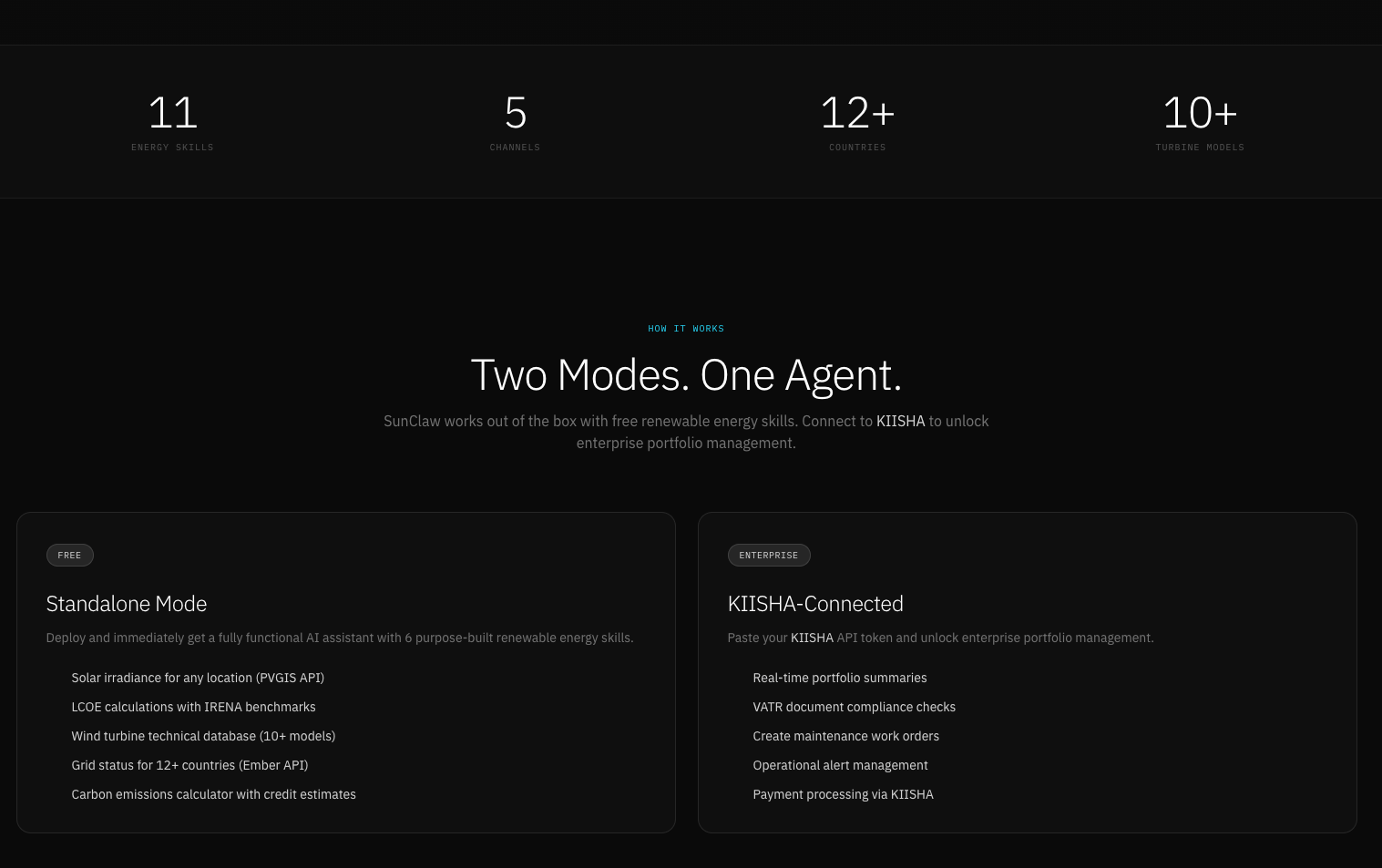
Mode 1: Standalone (Free)
No account needed. Deploy SunClaw and immediately get a fully functional AI assistant with 11 purpose-built renewable energy skills powered by OpenClaw. These aren’t generic chatbot party tricks. These are tools I actually use:
Solar irradiance lookup for any location worldwide (PVGIS and NREL APIs).
LCOE calculations with IRENA benchmark comparison.
Solar PV design, including module selection, string sizing, tilt and azimuth optimization.
Financial modeling with IRR, NPV, sensitivity analysis, debt sizing, and DSCR.
Battery storage sizing for AC and DC coupling, capacity modeling, degradation curves.
Wind turbine technical database covering 10+ major models.
Grid status for 12+ countries via Ember API.
PPA analysis covering tariff structure, bankability, and DSCR waterfall.
O&M diagnostics for performance ratio, fault detection, and inverter errors.
IRENA search with curated policy documents. Carbon emissions calculator with credit value estimates.
Plus all 50+ of OpenClaw’s built-in general-purpose skills (web search, file operations, calculator, and so on).
Price: $0/month. You bring your own infrastructure and API keys.
Mode 2: KIISHA-Connected (Enterprise)
Paste your KIISHA API token and unlock enterprise-grade portfolio management: real-time portfolio overview, VATR document compliance and gap analysis, maintenance work order creation, operational alert management, and payment initiation and tracking.
Price: $29/month (Pro) or custom (Enterprise). SunClaw manages the hosting for you.
The 4-Step Setup: Where Other Guides Lost Me, SunClaw Didn’t
This is the heart of the SunClaw experience. Where every other OpenClaw guide starts with git clone and a wall of terminal commands that assume you know what PATH means (I did not), SunClaw gives you a web-based wizard at sunclaw.kiisha.io/setup.
No CLI. No terminal. No Docker. Just click through four steps.
Step 1: Choose Your AI Provider
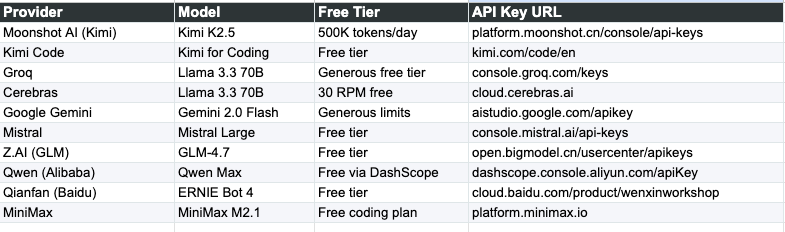
SunClaw supports 16+ LLM providers out of the box. Many of them have generous free tiers. You don’t need to spend anything to get started.
Free tier providers worth knowing about:
Moonshot AI (Kimi) gives you 500K tokens per day for free, and Kimi K2.5 is excellent for technical conversations. This is the default in SunClaw’s wizard for a reason. Groq offers a generous free tier running Llama 3.3 70B. Google Gemini’s free limits are solid. Cerebras gives you 30 requests per minute at no cost. Mistral, Qwen (Alibaba), MiniMax, and several others all have free tiers that’ll get you running without reaching for a credit card.
On the premium side, you’ve got Anthropic’s Claude (best reasoning, in my biased opinion), OpenAI’s GPT-4o and o3 models, DeepSeek for strong reasoning at low cost, Venice AI for privacy-first zero data retention, and xAI’s Grok for real-time knowledge.
And if you want to be clever about it, OpenRouter gives you access to 200+ models through a single API, including free models. One API key to rule them all.
There’s also Ollama if you want to run everything locally on your own hardware. No API key needed. Free forever. I haven’t tried this yet because I’m still recovering from my last encounter with local installations, but it’s there when I’m brave enough.
My recommendation for beginners: Start with Moonshot AI (Kimi). 500K free tokens per day is absurdly generous.
The wizard works simply. Click on a provider card, paste your API key, select a model, done.
Step 2: Connect Messaging Channels
This is where SunClaw’s multi-channel architecture shines. Your team uses different apps. SunClaw talks to all of them from a single brain.
Telegram is the recommended starting point for first-timers. SunClaw has a built-in BotFather setup wizard that walks you through creating a Telegram bot step by step. Open Telegram, search for @BotFather, send /newbot, follow the prompts, get a token, paste it into SunClaw. Done. No QR scans, no browser pairing, no device-level permissions.
WhatsApp connects via a QR code scan after deployment. Use a dedicated phone number for your bot.
Slack and Discord each need a bot token from their respective developer portals. Standard stuff if you’ve done it before, clearly documented if you haven’t.
Web Chat is enabled by default with zero setup. Great for testing.
Pro tip: Start with just Telegram and Web Chat. Add the others later from the SunClaw dashboard without redeploying. I learned this after trying to configure all five simultaneously and nearly having a breakdown.
Step 3: Connect to KIISHA (Optional)
This step is entirely optional. If you just want the 11 renewable energy skills and OpenClaw’s 50+ built-in capabilities, skip it. You’ll still have a powerful AI assistant.
But if you’re part of a renewable energy company using KIISHA for portfolio management, this is where it gets extraordinary. Generate a KIISHA API key from your settings, paste it into SunClaw, and suddenly your AI agent has access to your entire energy project data, compliance matrices, and financial models, all queryable through conversation. On your phone. While you’re in a taxi. Or pretending to pay attention in a meeting.
All write operations (creating tickets, initiating payments) require explicit confirmation before execution. The AI shows you a preview and asks for approval. No surprise actions. This is important when you’re dealing with assets worth what ours are worth.
Step 4: Deploy
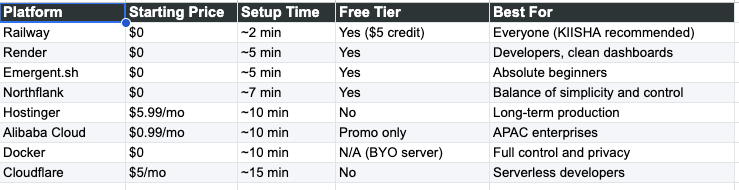
SunClaw supports 8 deployment platforms. The wizard generates all the environment variables from the previous steps automatically. You just pick a platform and go.
Here’s the menu:
Railway (recommended): About 2 minutes. Free tier with $5 trial credit. This is SunClaw’s primary platform with the tightest integration. For Pro and Enterprise users, the deployment is zero-touch. Click one button. SunClaw creates the Railway project, injects your config, assigns a domain, and deploys. Live in 90 seconds.
Emergent.sh: About 5 minutes. Free tier. The “I want it now” option. They’ve turned OpenClaw into a pre-built chip that launches instantly. If the word “Docker” makes you uncomfortable, start here.
Render: About 5 minutes. Free tier available. Blueprint-based deployment for developers who like clean dashboards and declarative infrastructure.
Northflank: About 7 minutes. Free tier. One-click template with persistent storage included, meaning your AI won’t forget everything when the server restarts.
Hostinger VPS: About 10 minutes. From $5.99/month. Dedicated IP, guaranteed resources, full root SSH access. Good for long-term production use.
Alibaba Cloud: About 10 minutes. From $0.99/month on promotional pricing. Best for APAC-facing teams with native Qwen integration.
Docker Self-Hosted: About 10 minutes. Free (bring your own server). The ultimate privacy option. Your data never touches any third-party cloud. Works on any Linux or macOS machine. One-line install script.
Cloudflare Workers: About 15 minutes. $5/month. Serverless edge deployment. If “Wrangler CLI” and “Workers Paid plan” sound unfamiliar, pick Railway or Emergent instead. I’m speaking from experience.
What Happens After You Deploy
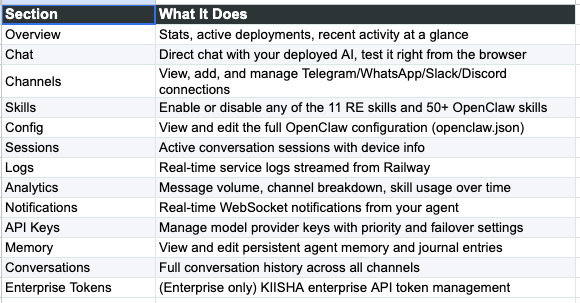
Once your SunClaw instance is live, you get a full Command Center dashboard with 13 sections: overview stats, direct chat testing, channel management, skill toggles, configuration editor, active sessions, real-time logs, analytics, notifications, API key management, persistent memory, conversation history, and enterprise token management.
First things to do:
Open the Chat section and ask: “What’s the solar irradiance for Lagos, Nigeria?” You should get back GHI, DNI, and DHI data within seconds. If you set up Telegram, go to your bot and send /start. Then connect WhatsApp via QR code if you need it. Browse the Skills section to toggle off anything you don’t need. And check Logs if anything doesn’t work, because that’s your debugging lifeline.
The Soul: Why This Isn’t Just Another Chatbot
One of the most underrated features of OpenClaw and by extension SunClaw is its Soul.md, a detailed system prompt that gives the AI a specific identity and deep domain expertise. This isn’t a general-purpose assistant that happens to know the word “solar.”
It has expert-level knowledge in solar PV design (module selection, string sizing with temperature corrections, tilt optimization, shading analysis, DC:AC ratio). Battery energy storage (AC/DC coupling, degradation modeling, round-trip efficiency, thermal management). PPAs (tariff structures, bankability, waterfall analysis, DSCR targets, offtaker risk). Financial modeling (LCOE, IRR/NPV, sensitivity analysis, debt sizing). O&M (performance ratio, fault detection, inverter error codes, degradation tracking). Grid connection by jurisdiction. Carbon credits across Gold Standard, Verra, and I-REC registries. Wind energy from Weibull distributions to wake effects.
It has deep regional knowledge for Kenya (EPRA, KPLC, ERC, FiT), South Africa (NERSA, Eskom, REIPPP, wheeling), and Nigeria (NERC, TCN, MYTO, mini-grid regulations). And it adapts for any global jurisdiction when you provide local parameters.
It has persistent memory. It remembers your projects, your preferences, your past conversations. It keeps a running knowledge base, a task tracker, and daily summaries. It will remind you about pending items you forgot. Like that EPRA license renewal you mentioned last week.
And it’s channel-aware. On WhatsApp and Telegram, it’s concise: leads with the answer, then shows working. On web chat and Slack, it gives more detail with tables and structured outputs. It never says “the PR metric experienced a negative delta” when it can say “the performance ratio dropped.”
My kind of AI.
Security (Because You Were Thinking It)
Your OpenClaw Gateway runs on your own infrastructure. Data stays under your control. SunClaw’s management layer sends configuration. It doesn’t store or relay your conversations.
All enterprise API calls between SunClaw and KIISHA require valid, scoped API keys. No open endpoints. Channel tokens and LLM API keys are encrypted at rest. They’re injected as environment variables at deploy time and never exposed through the UI. Every interaction is logged through KIISHA’s telemetry pipeline with complete visibility.
This matters when your AI agent has access to financial models for an 80MW solar portfolio. Which mine now does.
My Verdict: Which Path Should You Take?
After testing all 8 deployment options, here’s how I’d break it down.
If you’re a beginner who just wants to try it: Emergent.sh or Railway free tier. Both are free, take under 5 minutes, and require zero technical knowledge. Emergent is slightly easier. Railway gives you more control long-term.
If you’re running this for a real team: Railway Pro at $29/month. The zero-touch managed deployment is worth every penny. Click one button. Live in 90 seconds. Full dashboard with logs, analytics, and persistent memory.
If you’re an enterprise with KIISHA: Railway Enterprise plus the KIISHA connection. Dedicated infrastructure, managed LLM keys included, VATR compliance, portfolio management. The full package. This is what SunClaw was built for.
If you’re a developer who wants full control: Docker self-hosted or Cloudflare Workers. Docker gives you complete control on your own hardware. Cloudflare gives you serverless scale on the edge. Both require more technical skill but offer maximum flexibility.
If you’re APAC-based: Alibaba Cloud. The $0.99/month promotional pricing is hard to beat, and the native Qwen integration gives you a fully local AI stack.
The Fastest Path from Zero to Running
If you just want SunClaw running right now, here’s the absolute fastest path:
Go to sunclaw.kiisha.io
Create an account (email + password)
Select the Free plan
In the Setup Wizard: select Moonshot AI (Kimi), paste your API key from platform.moonshot.cn, select Kimi K2.5, enable Telegram and follow the BotFather wizard, skip the KIISHA enterprise step, select Railway and follow the 3-step template flow
Wait about 2 minutes for Railway to build
Open Telegram, find your bot, send
/startAsk: “What’s the solar irradiance for Nairobi, Kenya?”
Watch the magic happen
Total time: under 10 minutes. Total cost: $0.
The Birthday Part
I should probably tell you about the birthday.
When the KIISHA team sent me SunClaw, I didn’t just get a deployment tool. They built a bridge connecting KIISHA directly to OpenClaw. My personal AI agent now has access to my energy project data, compliance matrices, and financial models. All queryable through conversation on my phone.
My productivity in the last few hours has been something else. I asked it to pull the LCOE comparison for a biomass project I’m working on with a major brewer in Nigeria. It pulled the data, cross-referenced against IRENA benchmarks, and formatted it for an investor memo. On WhatsApp. While I was eating birthday cake.
I’ve structured deals worth hundreds of millions across multiple countries. I’ve managed solar portfolios for large multinationals and brands on the S&P 500. I’ve done all of it the hard way, with spreadsheets and email threads and manual data extraction.
This is different. Not incrementally different. Categorically different.
What’s Next?
Once you’ve deployed SunClaw, the real fun begins. Ask it to calculate LCOE for your next solar project. Get irradiance data for any site location. Run a financial model with IRR, NPV, and DSCR analysis. Check grid status for any of the 12+ supported countries. Estimate carbon credits. Analyze a PPA for bankability and tariff structure.
And if you connect to KIISHA, you can manage your entire renewable energy portfolio through chat, across WhatsApp, Telegram, Slack, Discord, or the web.
The AI agent revolution isn’t just for developers anymore. SunClaw makes it accessible to every renewable energy professional. Even the ones who can’t figure out Docker.
Especially those ones. I would know.
Links & Resources
SunClaw Website: sunclaw.kiisha.io
KIISHA Platform: kiisha.io
OpenClaw GitHub: github.com/openclaw/openclaw
OpenClaw Docs: docs.openclaw.ai
Happy birthday to me.
Try it out: sunclaw.kiisha.io
P.S. I should mention that during one of my early SunClaw test runs I accidentally deployed three separate Telegram bots because I kept hitting “Deploy” thinking nothing was happening. All three went live simultaneously and started responding to the same messages. Watching three AI agents argue with each other about the optimal tilt angle for a solar array in Abuja was both the most entertaining and the most professionally embarrassing thing that has happened to me this quarter. The bar is low but it exists.
P.P.S. The business model is worth noting. SunClaw gives away the entire renewable energy skill set for $0/month. Eleven purpose-built AI skills, fifty-plus general skills, the guided setup wizard, everything. The paid tier charges for managed hosting, persistent memory, and convenience. Which is the correct approach to developer tools in 2026. Give away the value, charge for the infrastructure. The AI is the commodity. The operational reliability is the moat. KIISHA seems to understand this.
P.P.P.S. The fact that you can run this entirely on Ollama with local models and zero API keys means organisations with strict data sovereignty requirements in markets like Nigeria and Kenya can deploy a fully functional renewable energy AI assistant without any data ever leaving their premises. Zero external API calls. Zero cloud dependencies. That is not a nice-to-have. In Africa, data residency is increasingly a regulatory requirement.
P.P.P.P.S. I am genuinely curious to see what happens when field engineers start using this on WhatsApp. Not project managers in air-conditioned offices. The engineers who need irradiance data at a site, who need to check if a performance ratio is within range, who need to verify a grid connection requirement while standing next to a transformer. That is the use case that determines whether this matters or whether it is just another demo. SunClaw’s WhatsApp integration and channel-aware communication style suggest the KIISHA team is building for exactly that scenario. The proof will be in the usage data.
Built by KIISHA Technologies. Powered by OpenClaw.
If you found an error in this post, congratulations. You’re more qualified than me. Drop a comment and help me update my notes. Promise I’ll fix it in v47_FINAL_FINAL_actually_final.
Appendix: Full Technical Reference
Everything below is the reference material. If the narrative above was the “why” and the “what,” this appendix is the “show me every single detail so I can actually do it.” Bookmark this section. You’ll come back to it.
Appendix A: Complete AI Provider Reference
Free Tier Providers
Premium Providers

Model Gateways & Aggregators

Local (Free Forever)

How the Wizard Works
You click on a provider card, paste your API key, and select a model. Each provider has 2-6 model options with tags like “default”, “fast”, “reasoning”, and “code” to help you choose. The key format is provider/model-id, for example moonshot/kimi-k2.5 or anthropic/claude-sonnet-4-20250514.
Security note: Your API key never leaves your server. SunClaw stores it as an environment variable on your deployment platform, not in SunClaw’s database.
Appendix B: Channel Setup Details
WhatsApp (Enabled by Default)
Connects via WhatsApp Web using a QR code scan after deployment. Use a dedicated phone number for your SunClaw bot. No API key needed, just scan the QR code from the SunClaw dashboard post-deploy.
Telegram (Recommended for First-Timers)
SunClaw has a built-in BotFather setup wizard that walks you through every step:
Open Telegram and search for @BotFather
Send
/newbotand follow the prompts to name your botBotFather gives you a bot token (looks like
123456:ABC-DEF1234ghIkl-zyx57W2v1u123ew11)Paste the token into SunClaw’s wizard
Done. Your bot is connected.
If you’re not very technical, Telegram is by far the easiest channel to set up. No QR scans, no browser pairing, no device-level permissions. You create a bot, paste the token, and you’re live.
Slack
Create a Slack app at api.slack.com/apps
Enable Bot User and get the Bot User OAuth Token
Paste the token into SunClaw
Discord
Create a Discord bot at the Discord Developer Portal
Get the bot token
Paste it into SunClaw
Web Chat (Enabled by Default)
Built-in web chat widget with zero setup needed. Available at your SunClaw instance URL. Great for internal use and testing.
Appendix C: KIISHA Enterprise Connection Details
Step-by-Step
Get your KIISHA API Key: Go to KIISHA Settings, API Keys, generate a new API key, and copy it.
Paste into SunClaw: Toggle “KIISHA Enterprise” on in the wizard. The KIISHA URL defaults to
https://app.kiisha.io
. Paste your API key.
Webhook Secret: SunClaw auto-generates a 64-character hex webhook secret. This is used for secure communication between your OpenClaw instance and KIISHA. You’ll need to set this same value as
OPENCLAW_WEBHOOK_SECRETin your KIISHA environment.
What This Unlocks
Portfolio summaries across all your renewable energy assets. VATR document compliance checks and gap analysis. Ability to create maintenance work orders from chat. Operational alert management in real-time. Payment initiation and tracking through KIISHA.
All KIISHA write operations (creating tickets, initiating payments) require explicit user confirmation before execution. The AI will show you a preview and ask for approval. No surprise actions.
Appendix D: Full Deployment Platform Reference
Before deploying, you can name your instance (default: my-sunclaw). This becomes part of your deployment URL.
1. Railway (KIISHA Recommended)
Setup Time: ~2 minutes | Pricing: $0 free tier ($5 trial credit) | Complexity: Beginner | Best For: Everyone
Railway is SunClaw’s primary deployment platform with the tightest integration, including zero-touch managed deployments for Pro/Enterprise users.
Free Tier Flow (Self-Hosted):
Sub-step 1: Create a Railway Account. Go to railway.com. Sign up with your GitHub account for the fastest setup. Railway gives you $5 of free trial credit, enough to run SunClaw for several days.
Sub-step 2: Review Your Configuration. SunClaw shows you all the environment variables generated from Steps 1-3. These will be automatically pre-filled in the Railway template. Review them and make sure your API key and channel tokens look correct.
Sub-step 3: Deploy from Template. Click “Deploy to Railway,” which opens Railway with your config pre-filled. Click “Deploy” on Railway’s page. Wait about 2 minutes for the Docker image to build. Your SunClaw instance is live.
The generated .env configuration looks like this:
# SunClaw Configuration -- Generated by Setup Wizard
# --- AI Provider ---
LLM_PROVIDER=moonshot
LLM_API_KEY=sk-your-key-here
LLM_MODEL=moonshot/kimi-k2.5

# --- Channels ---
WHATSAPP_ENABLED=true
TELEGRAM_ENABLED=true
TELEGRAM_BOT_TOKEN=123456:ABC-DEF1234ghIkl-zyx57W2v1u123ew11
SLACK_ENABLED=false
DISCORD_ENABLED=false

# --- KIISHA Enterprise ---
KIISHA_ENABLED=false

# --- Dashboard ---
DASHBOARD_PORT=3001
GATEWAY_PORT=3000
INSTANCE_NAME=my-sunclaw
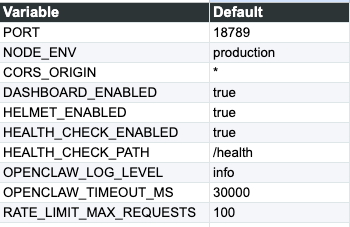
Railway Template Defaults (auto-configured for you):
Pro/Enterprise Flow (Managed, Zero-Touch):
Click “Deploy to Railway Now”
SunClaw automatically creates a new Railway project, connects the GitHub repository, sets all environment variables, creates a public domain, and triggers the first deployment
Watch the progress bar as it builds and deploys
When it says “SunClaw is live!” click to open your instance
The entire process takes about 90 seconds. Zero touch. Zero terminal.
After deploy: You get a Railway dashboard link and your SunClaw instance URL. The first request might take 1-2 minutes to warm up.
2. Render (Infrastructure as Code)
Setup Time: ~5 minutes | Pricing: Free tier, paid from $7/mo | Complexity: Beginner | Best For: Developers who love clean dashboards
Render uses a blueprint-based deployment system. If you prefer declarative infrastructure, this is a great option.
Click the Deploy to Render link from SunClaw’s wizard, which opens
render.com/deploy?repo=https://github.com/kaykluz/sunclawSet environment variables. Render will prompt you to add your
SETUP_PASSWORDand any other env vars from the wizardBuild and Deploy. Render automatically builds the Docker image and deploys
Complete the setup wizard. Navigate to
https://your-service.onrender.com/setup, enter your password, and configure channels
Features: free tier available, auto-deploy from GitHub, built-in SSL and CDN, easy environment variable management.
3. Hostinger (Dedicated VPS)
Setup Time: ~10 minutes | Pricing: From $5.99/mo | Complexity: Intermediate | Best For: Long-term production use
Full control with a dedicated IP address and guaranteed resources. Pre-built OpenClaw Docker template.
Pick a Plan. Go to hostinger.com/vps and select a KVM VPS plan (KVM 2 recommended)
Select the OpenClaw Template. During checkout, choose the “OpenClaw” Docker template at hostinger.com/vps/docker/openclaw
Get Your Token. Once deployed, check your dashboard for the
OPENCLAW_GATEWAY_TOKENAccess the UI. Navigate to your VPS IP address and paste the token
Connect Channels. Go to the Channels tab and configure Telegram, WhatsApp, and others
Features: dedicated IP and resources, 99.9% uptime guarantee, full root SSH access, OpenClaw Docker template pre-installed.
4. Emergent.sh (The Fastest Path)
Setup Time: ~5 minutes | Pricing: Free tier available | Complexity: Beginner | Best For: Absolute beginners who want to test immediately
Emergent.sh is the “I want it now” option. They’ve turned OpenClaw into a pre-built “chip” called MoltBot that launches instantly.
Go to emergent.sh
Select the MoltBot Chip. Look for the OpenClaw/MoltBot chip
Hit Launch. Emergent automatically provisions a VM, installs everything, and sets up the runtime
Connect LLM. Paste your API key (or use Emergent’s managed keys)
Publish. Click “Publish” to keep your bot online 24/7
Tutorial: emergent.sh/tutorial/moltbot-on-emergent
Features: no terminal required at all, free tier available, pre-built OpenClaw image, instant provisioning.
5. Northflank (One-Click Template)
Setup Time: ~7 minutes | Pricing: Free tier, paid ~$5-10/mo | Complexity: Beginner | Best For: Balance of simplicity and control
Northflank provides a one-click template for OpenClaw with persistent storage included, meaning your AI won’t forget everything when the server restarts.
Click the Deploy OpenClaw button which opens the Northflank template
Create an account if you don’t have one
Deploy the stack. Set the
SETUP_PASSWORDenvironment variableComplete setup. Open the public URL and configure at
/setup
Features: one-click deploy stack, free tier available, persistent storage included, easy environment management.
6. Cloudflare Workers (Serverless Edge)
Setup Time: ~15 minutes | Pricing: $5/mo (Workers Paid plan) | Complexity: Developer | Best For: Developers who want serverless architecture
Run OpenClaw as a serverless agent on Cloudflare’s global edge network using MoltWorker. This is the most technical option.
Clone the MoltWorker repository locally
Run
npm installSet your API key:
npx wrangler secret put ANTHROPIC_API_KEYGenerate a gateway token:
export MOLTBOT_GATEWAY_TOKEN=$(openssl rand -hex 32)echo "$MOLTBOT_GATEWAY_TOKEN" | npx wrangler secret put MOLTBOT_GATEWAY_TOKEN
Deploy:
npm run deployAccess the Control UI at
https://your-worker.workers.dev/?token=YOUR_GATEWAY_TOKEN
Features: global edge network (low latency worldwide), serverless architecture (scales automatically), Cloudflare Access security, Sandbox SDK integration.
Note: If “Wrangler CLI” and “Workers Paid plan” sound unfamiliar, pick Railway or Emergent instead.
7. Alibaba Cloud (Asia-Optimized)
Setup Time: ~10 minutes | Pricing: From $0.99/mo (promo) | Complexity: Intermediate | Best For: APAC-facing enterprises
Deploy on Alibaba Cloud’s Simple Application Server with the OpenClaw image. Best for teams in Asia-Pacific who want low-latency access and integration with Alibaba’s Model Studio (Qwen).
Go to the Alibaba Cloud OpenClaw template
Select the OpenClaw image during setup
Configure environment variables with your API key and channel tokens
Deploy and access the setup wizard at your server URL
Features: starting at $0.99/month promotional pricing for new users, pre-built OpenClaw image, Qwen (Alibaba’s LLM) Model Studio integration, multi-region deployment.
8. Docker Self-Hosted (Full Control)
Setup Time: ~10 minutes | Pricing: $0 (bring your own server) | Complexity: Intermediate | Best For: Full control and maximum privacy
If you want everything on your own hardware, whether a VPS, a spare laptop, a Mac Mini, or a Raspberry Pi, the Docker self-hosted option gives you a one-line install script.
Copy the install command from SunClaw’s wizard, which includes all your environment variables from Steps 1-3
Run it on any Linux or macOS server. The script auto-installs Docker and all dependencies
Wait for the build, takes 2-5 minutes depending on your server
Access SunClaw at
http://your-server-ip:3000
Features: works on any Linux/macOS server, auto-installs all dependencies, full filesystem access, no vendor lock-in (you own everything).
This is the ultimate privacy option. Your data never touches any third-party cloud. Perfect for organisations with strict data residency requirements.
Appendix E: Post-Deploy Dashboard Reference
Once your SunClaw instance is live, you get access to a full Command Center dashboard with 13 sections:
Persistent Memory System
SunClaw remembers your projects, preferences, and past conversations through three files:
memory.md is a running knowledge base: your name, role, company, active projects, equipment preferences, regulatory context.
todo.md is an ongoing task tracker with deadlines and follow-ups.
daily-log.md contains end-of-day summaries of what was accomplished and what’s pending.
At the start of every conversation, the AI reviews its memory to restore context. It will proactively remind you of pending items: “By the way, the EPRA license renewal you mentioned last week is coming up.”
Appendix F: Pricing Comparison
Deployment Platforms
SunClaw Plans
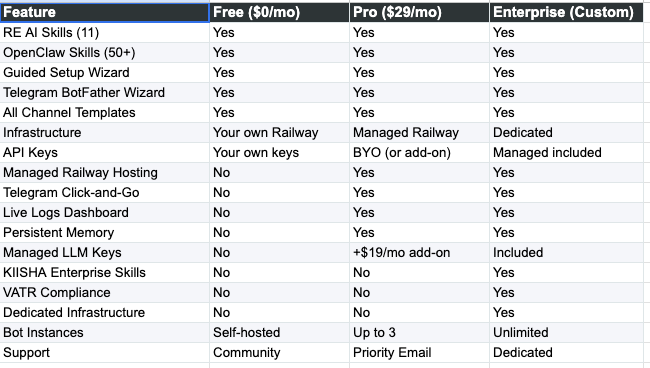
Add-On: Managed LLM Keys
Don’t want to manage your own API keys? SunClaw offers a Managed LLM Keys add-on for $19/month. They provide and manage keys for OpenAI, Anthropic, and other providers so you can focus on using the AI, not managing billing across 5 different API dashboards.
Bundle deal: Pro + Managed Keys = $48/month (saves you the hassle of managing both infrastructure and API keys).
Another good way to do this is via Claw for All